
How to add updates on the progress of your campaign?
- Web
Good to know: Regularly publishing updates (news, project progress, thank yous) is essential to maintain your donors' trust and encourage new contributions. Donors like to know how the project is evolving!
1 Access your campaign management
As with editing, first go to your campaign management space:
- Log in to your account at crowdfunding.faroty.com/login.
- Click on your profile, go to the "Dashboard", then to "My campaigns".
-
Choose the relevant campaign, then click on the
 button to open the management options.
2 Open the Updates section
This is where you manage communication with your contributors:
- In your campaign management menu, locate and click on the "News" or "Updates" tab.
-
Then click on the
 button
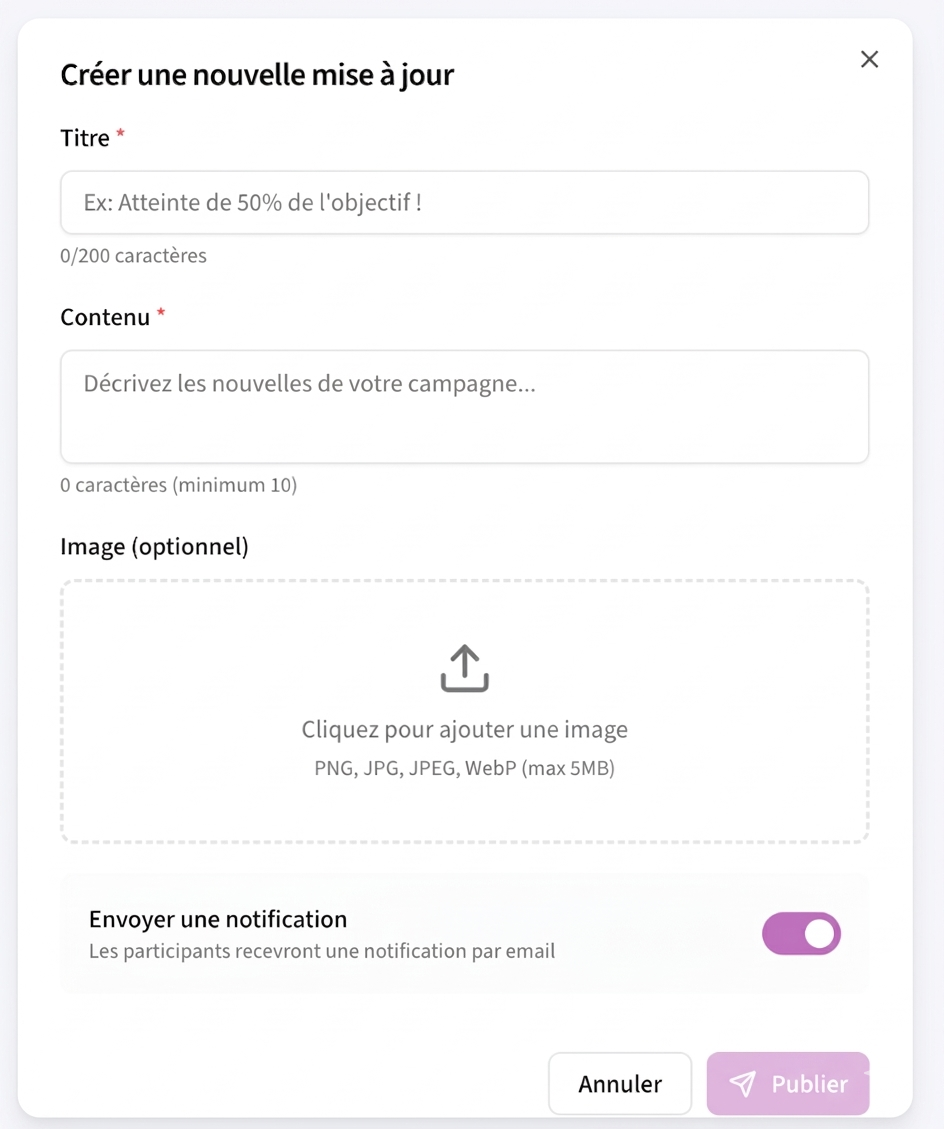
3 Write your message
A text editor will appear allowing you to compose your message:
- Update title: Give your news a clear title (e.g., "50% goal reached, THANK YOU!" or "The equipment has been ordered").
- Content (Description): Write your message. Explain the progress, thank the donors, or share the next steps.
- Add an image (Optional): If possible, illustrate your point with a photo (e.g., a photo of the site, a receipt, or the team at work). A picture is worth a thousand words!
4 Publish the update
So that your community can read the news:
- Proofread your text to ensure there are no mistakes.
- Click the "Publish" button at the bottom of the form.
- The update will now appear publicly on your campaign page (in the "News" or "Updates" tab), visible to all visitors.